Home Screen vs Wallpaper: Complete Differences Explained
Introduction to Device Interfaces
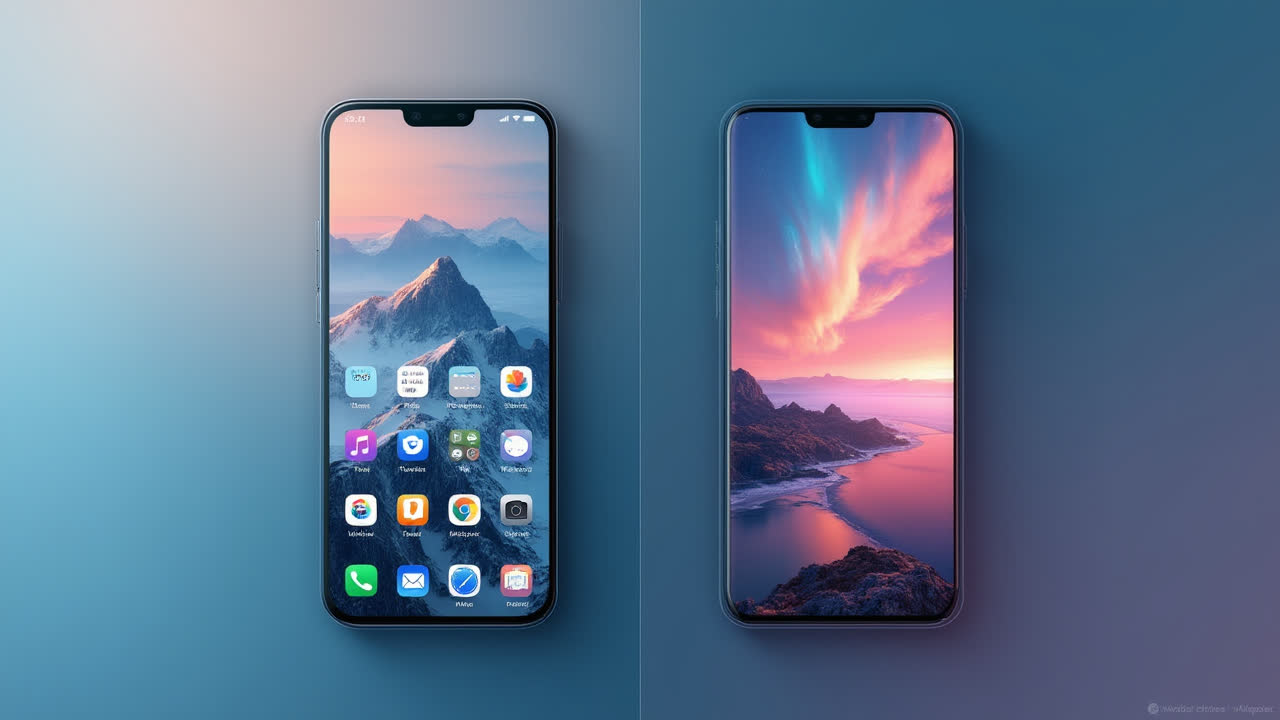
Have you ever wondered about the difference between home screen and wallpaper on your smartphone or computer? While we interact with these elements daily, many users confuse these two distinct components of modern device interfaces. The home screen serves as your device's main operational hub, while wallpaper is simply the decorative background image that enhances visual appeal. Understanding how these elements work together can help you personalize your device more effectively.
When you unlock your phone or boot up your computer, the first thing you see is your home screen with its background image—the wallpaper. These two elements create your first impression of the device, yet they serve completely different purposes in the overall user experience. In this comprehensive guide, we'll explore what sets them apart and how they complement each other to create the interface you interact with every day.
What Is a Home Screen?
The home screen functions as the primary interface on your mobile device or computer. It's essentially the main screen you see after unlocking your device or starting your computer, serving as a launch pad for accessing applications, settings, and notifications. Think of it as your digital dashboard—the central command center for all device operations and functions.
On smartphones, the home screen typically displays in a grid format with app icons, widgets, and folders organized according to user preference. Most modern devices allow for multiple home screen pages that you can swipe through to access different app collections. Some phones even feature a special pane that shows push notifications or selected system settings for quick access.
Desktop computers also feature home screens (often called desktops), though they function slightly differently from mobile versions. Computer home screens typically provide more freedom for organization, allowing users to create folders, shortcuts, and custom layouts. They're designed to help you navigate efficiently through your digital workspace, displaying important system information and providing quick access to frequently used programs.
One interesting aspect of home screens is their customizability. Device manufacturers recognize that user preferences vary widely, so they've made home screens highly adaptable. You can rearrange icons, resize widgets, group applications into folders, and even install third-party launchers that completely transform the look and functionality of your home screen. This flexibility allows each user to create an interface that best suits their specific needs and workflow habits.
What Is a Wallpaper?
Wallpaper, in the digital context, refers to the background image displayed on your home screen. It's purely decorative in nature, unlike the functional elements of the home screen itself. The term "wallpaper" was borrowed from interior design, where it similarly refers to decorative coverings applied to walls. In the digital world, wallpapers help personalize your device and make it visually appealing.
When you purchase a new device, it comes with default wallpapers pre-installed by the manufacturer. These are often professionally designed images that showcase the screen's display capabilities. However, most users eventually replace these with personal photos, artwork, or specialized wallpaper designs downloaded from the internet. There's an entire industry dedicated to creating digital wallpapers, with countless websites and applications offering millions of options ranging from minimalist patterns to elaborate artwork.
Modern operating systems have introduced more dynamic forms of wallpaper. For instance, live wallpapers on Android devices and certain Windows computers feature animation or interactive elements. These might respond to touch, change with the time of day, or display information like weather conditions. Some even utilize your device's accelerometer to create parallax effects as you move your phone.
Interestingly, wallpaper choices often reflect personal identity. A study by the University of Pennsylvania found that people tend to select wallpapers that either represent aspirational goals or remind them of positive experiences. Whether it's a photo of loved ones, a favorite vacation destination, or an inspiring quote, wallpapers often hold personal significance beyond mere decoration.
Key Differences Between Home Screen and Wallpaper
| Feature | Home Screen | Wallpaper |
|---|---|---|
| Definition | Main interface of a device that displays app icons, widgets, and system information | Background image displayed behind the home screen elements |
| Primary Function | Provides access to applications, settings, and notifications | Decorative element that enhances visual appeal |
| Interactivity | Highly interactive with tappable icons and widgets | Generally non-interactive (except for live wallpapers) |
| Customization Options | Rearranging icons, adding widgets, changing layouts, installing launchers | Changing images, applying filters, using live or dynamic images |
| System Impact | Affects device functionality and user workflow | Primarily affects aesthetics; complex wallpapers may impact battery life |
| Relationship | Contains and displays the functional elements | Serves as the background for the home screen |
| Evolution | Has evolved to include widgets, folders, app drawers, and multiple pages | Has evolved from static images to dynamic, interactive backgrounds |
| User Importance | Critical for device usability and productivity | Important for personalization and aesthetic preferences |
The Evolution of Home Screens and Wallpapers
Both home screens and wallpapers have undergone significant evolution since the early days of computing. Early computer interfaces featured command-line prompts with no graphical elements whatsoever. The introduction of graphical user interfaces (GUIs) in the 1980s marked the beginning of what we now recognize as home screens. These early interfaces were basic by today's standards—simple icons on a plain background with limited customization options.
The concept of digital wallpaper emerged alongside these early GUIs, though options were initially quite limited due to technical constraints. Early computer monitors could display only 16 colors at most, severely restricting wallpaper design possibilities. As technology advanced through the 1990s and 2000s, so did the complexity and versatility of both home screens and wallpapers.
The smartphone revolution of the late 2000s triggered another major leap forward. Touch interfaces created new possibilities for home screen interaction, while high-resolution displays made wallpapers more vibrant and detailed. Today's devices offer unprecedented customization options, with some operating systems allowing users to create personalized themes that coordinate wallpapers with icon styles, color schemes, and even sound effects.
Looking toward the future, emerging technologies like augmented reality (AR) and artificial intelligence (AI) promise to further transform these elements. We're already seeing the beginnings of this with wallpapers that respond to environmental conditions and home screens that adapt based on user behavior patterns. Some experimental interfaces are even moving beyond the traditional concept of wallpaper altogether, employing three-dimensional spaces or continuous scrolling environments instead of static backgrounds.
How They Work Together
While we've focused on the differences between home screens and wallpapers, it's important to understand how these elements complement each other to create a cohesive user experience. The wallpaper serves as the foundation layer, establishing the visual tone for your device. The home screen elements—icons, widgets, and system indicators—sit atop this foundation, creating a complete interface.
Effective customization often involves coordinating these elements. Many users select wallpapers that provide adequate contrast with app icons, ensuring everything remains visible and accessible. Others create themed setups where icon packs and widgets are chosen specifically to complement the wallpaper design. These thoughtfully coordinated interfaces can significantly enhance both the aesthetic appeal and functional efficiency of a device.
Interestingly, research in user experience design suggests that harmonious interfaces may actually improve user satisfaction and productivity. A study published in the Journal of Consumer Research found that users report more positive experiences with devices when the visual elements feel cohesive rather than disjointed. This explains why major technology companies invest heavily in creating pre-designed themes that coordinate wallpapers with other interface elements.
Device manufacturers and operating system developers understand this relationship well. That's why they often release coordinated design packages with each major update. For example, when Apple releases a new version of iOS or macOS, it typically includes a suite of new wallpapers designed specifically to showcase the updated home screen features. Similarly, Google's Material Design philosophy provides guidelines for how wallpapers and interface elements should work together on Android devices.
Frequently Asked Questions
Can I have different wallpapers for my lock screen and home screen?
Yes, most modern smartphones allow you to set different wallpapers for your lock screen and home screen. This feature enables more personalization options and practical benefits. For example, you might choose a darker, more subtle wallpaper for your home screen to make icons more visible, while selecting a more vibrant or personal image for your lock screen. To change these settings, typically go to your device's wallpaper settings where you'll find options to set images for either or both screens.
Do live wallpapers drain battery faster than static images?
Yes, live wallpapers typically consume more battery power than static images. The animated elements require continuous processing power and graphic rendering, which increases battery usage. The exact impact depends on the complexity of the live wallpaper and your device specifications. Simple animations might have minimal effect, while complex interactive wallpapers with 3D elements can significantly reduce battery life. If battery conservation is important to you, it's generally better to use static wallpapers, especially on older devices with limited battery capacity.
Can I completely replace my device's default home screen?
On Android devices, you can completely replace the default home screen by installing third-party launcher applications from the Google Play Store. Popular options include Nova Launcher, Microsoft Launcher, and Action Launcher. These apps provide extensive customization options beyond what's available in the stock interface, including unique layouts, gesture controls, and special effects. However, on iOS devices (iPhones and iPads), Apple does not allow complete replacement of the home screen interface. While iOS 14 and later versions offer some customization through widgets and app icon changes, the fundamental home screen structure remains controlled by Apple.
Conclusion
The distinction between home screen and wallpaper is fundamental to understanding modern device interfaces. While the home screen provides functionality and access to your device's features, the wallpaper adds personalization and aesthetic appeal. Together, they create the visual environment you interact with whenever you use your device.
As technology continues to evolve, we can expect both elements to become even more sophisticated, offering new ways to customize and interact with our digital spaces. Whether you're a tech enthusiast who enjoys creating elaborately themed setups or a casual user who sticks with default options, understanding these components can help you get the most from your digital experience.
Next time you unlock your phone or boot up your computer, take a moment to appreciate how these distinct elements work together to create your unique digital environment. After all, in our increasingly digital world, these spaces represent some of our most frequently visited "rooms"—why not make them both functional and beautiful?